Last Updated: October 30, 2026
Quick Summary
No, the evidence does not show that cgm armbands themselves cause skin irritation. Research points to sensor adhesives and device materials as the usual culprit, with adhesive-related irritation being the main reason many adults and children stopped using a CGM. Armbands sit over the device, not on the adhesive site.
- A 2019 review found adhesive-related irritation was the main reason 42% of adults and 40% of children stopped using a CGM.
- Irritant contact dermatitis stays at the contact site, while allergic contact dermatitis can spread past the patch.
- Remove a sensor gently, wash with mild soap and lukewarm water, and let the skin breathe.
- Dexcom advises barrier patches and bandages are a fallback only if barrier film did not work.
- A snug armband should let you slide a finger underneath without leaving deep marks.
Table of Contents
- Do CGM Armbands Actually Cause Skin Irritation?
- Telling CGM Adhesive Allergy Apart From Plain Irritation
- CGM Sensor Rash Treatment: A Step-by-Step Response Plan
- How to Prevent CGM Skin Irritation Before It Starts
- CGM Armband Fit and Comfort: Getting It Right
- When to Stop Using a Device and Call a Healthcare Professional
- Choosing a Sensor Armband That Works With Your Skin
- Frequently Asked Questions
Do CGM Armbands Actually Cause Skin Irritation?
No. The evidence does not show that CGM armbands themselves cause skin irritation, and that distinction matters.
A systematic review and meta-analysis led by N. Asarani (2019) found that adhesive-related skin irritation was the main reason 42% of adults and 40% of children stopped using a CGM or flash glucose monitor.
CGM armbands are fabric or silicone bands that hold a sensor in place on your arm. They sit over the device, not on the adhesive site itself.
What the Research Says About Sensor Adhesives
The irritation trail leads to the adhesive and the device materials. A review by Englert and coauthors (2014) describes rashes tied to CGM adhesives, other adhesive products, and the plastic or nickel parts of sensors and support mounts.
Researchers studying FreeStyle Libre users have reported contact dermatitis, with reactions often attributed to adhesive components.
So the culprit is usually the sticky stuff, not the strap.
Where Armbands Fit in the Irritation Picture
The research available here does not report a measured irritation rate for protective armbands.
Telling CGM Adhesive Allergy Apart From Plain Irritation
Not every red patch is an allergy, and treating it like one sends people down the wrong path. The distinction between irritant and allergic contact dermatitis decides what you do next.
Irritant vs. Allergic Contact Dermatitis
Irritant contact dermatitis is damage from direct contact. It shows up as redness, dryness, itching, or burning right where the adhesive sat. Sweat, friction, and repeated removal make it worse.
Allergic contact dermatitis is an immune response. It often spreads beyond the patch, gets itchier over repeated exposures, and can include bumps or blisters.
| Feature | Irritant Contact Dermatitis | Allergic Contact Dermatitis | Infection |
|---|---|---|---|
| Onset | Soon after contact | Often delayed, worsens with repeat use | Days after a break in the skin |
| Spread | Stays at the contact site | Can spread past the patch | Spreads outward, feels hot |
| Look | Red, dry, itchy, burning | Bumps, blisters, intense itch | Pus, swelling, warmth, fever |
| Response | Barrier film, site rotation | Stop the product, see a clinician | Seek medical care promptly |
Signs That Point to Infection Instead
Infection is the one you do not wait on. Watch for pus, spreading warmth, swelling, red streaks, or fever. A device alert on your CGM plus any of these signs means call a healthcare professional.
CGM Sensor Rash Treatment: A Step-by-Step Response Plan
Match your response to how bad the reaction is. Most mild cases settle with simple steps at home.
Mild Reactions: Itching, Redness, Dry Skin
- Remove the sensor or adhesive gently, never rip it off.
- Wash the area with mild soap and lukewarm water.
- Pat dry and leave the skin bare to breathe.
- Apply a barrier film before your next sensor, per manufacturer guidance.
- Move the next sensor to a different spot.
Dexcom advises that barrier films may help prevent mild irritation, and that barrier patches and bandages are a fallback only if barrier film did not work.
Moderate to Severe Reactions: Bumps and Blistering
Stop using the adhesive on that site. Do not reapply over broken skin. Photograph the reaction for your clinician, then contact a healthcare professional before your next sensor.
Watch out: continuing to apply adhesive over blistered skin can cause skin damage and raise the risk of infection.
How to Prevent CGM Skin Irritation Before It Starts
Prevention beats treatment, and the basics are simple. Active readers can also browse the best CGM accessories for active lifestyles for ideas that reduce friction and irritation. The CDC advises changing where the sensor is placed and following the CGM manufacturer’s instructions, noting CGMs need replacement every 7 to 14 days. But the details of how you rotate, prep, and protect the site are where most people go wrong, and where competitors stay vague.
Site Rotation, Skin Barrier Products, and Healing Time
- Rotate sites so each patch of skin gets a break. A common pattern is to alternate sides and move at least an inch or two from the last site, so no single patch sees adhesive two sensor cycles in a row.
- Use a barrier film under the adhesive where your device maker allows it.
- Let irritated skin heal fully before placing a sensor there again, usually until redness and dryness are gone, not just until the itch stops.
Choosing and Applying a Barrier Product Safely
Barrier products are not one-size-fits-all, and the trade-offs matter:
- Barrier films (liquid or wipe-on): form a thin, breathable layer between skin and adhesive. They tend to preserve sensor adhesion better than thick creams, but they must dry completely before you apply the sensor or the patch will lift.
- Barrier patches and under-sensor dressings: sit between the adhesive and skin. They can help when film alone fails, but they add bulk and may reduce adhesion, Dexcom advises that barrier patches and bandages are a fallback only if barrier film did not work.
- Creams and ointments: are generally a poor choice under a sensor because they prevent the adhesive from bonding and can cause the device to peel early.
Patch-test any new barrier product on a small area of intact skin away from the sensor site for 24 to 48 hours before relying on it under a device. This is the same logic clinicians use for patch testing, and it costs you nothing but a day.
Always check your specific device’s instructions for use before adding any product under the sensor. Some manufacturers warn against certain barriers because they interfere with adhesion or sensor performance, and a product that works for one sensor model may not be cleared for another.
Matching Prevention to Your Sensor and Skin
Adhesive formulations and sensor designs vary by model, so a routine that works for one wearer can fail for another. A neutral way to sort this out with your care team is to note which sensor model and which barrier product you used each time a reaction appears, then review the pattern at your next visit. That record is far more useful than brand claims.
CGM Armband Fit and Comfort: Getting It Right
Fit is where armbands earn their keep, and where a bad fit causes trouble. If your band keeps slipping or peeling, see how to stop CGM sensor peeling off for practical fixes.
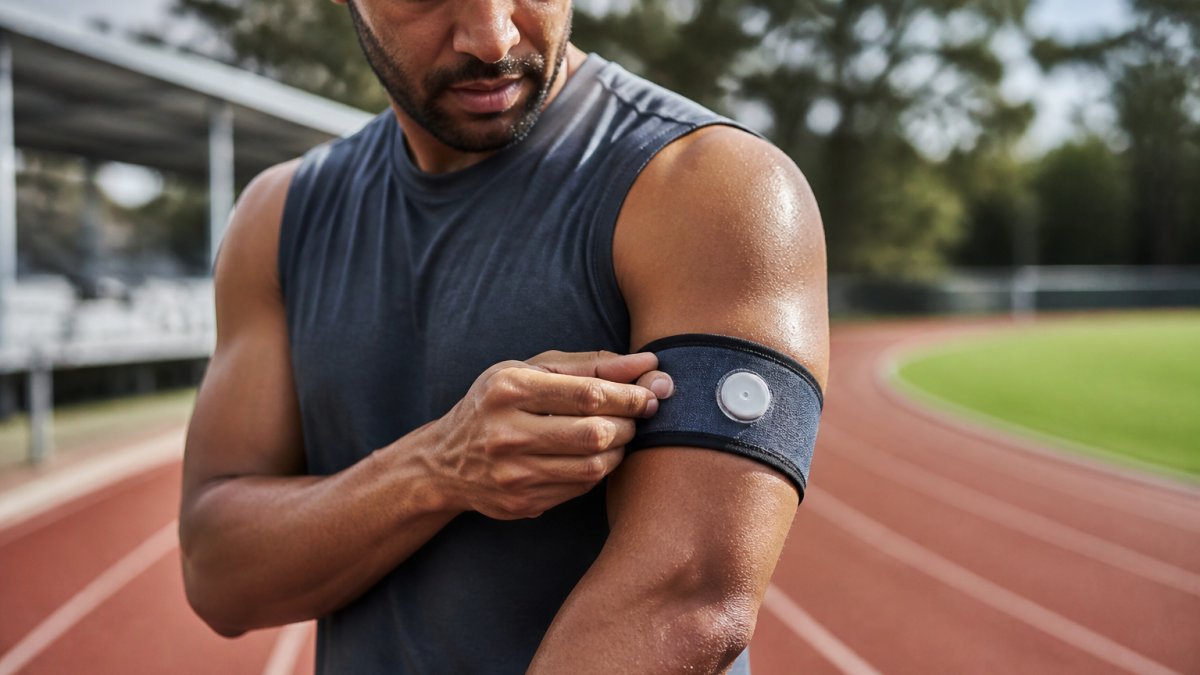
How Tight Should a CGM Armband Be?
Snug enough to hold the sensor flat, loose enough to slide a finger underneath. If it leaves deep marks or feels tight after ten minutes, it is too tight. If it shifts when you move, it is too loose.
When to Stop Using a Device and Call a Healthcare Professional
Some reactions need a clinician, not a home remedy. The tricky part is that irritation, allergy, and infection can look similar at the start, so the decision to stop the device and escalate should track severity, not guesswork. Here is a practical escalation plan.
Stop the Device and Call a Healthcare Professional Now If You See:
- Blisters, oozing, or open skin
- Swelling, warmth, or red streaks spreading from the site
- Fever alongside a skin reaction
These signs point away from simple irritation and toward allergic contact dermatitis or a possible infection. Do not reapply a sensor over broken or blistered skin while you wait to be seen.
Pause and Reassess Before Your Next Sensor If You See:
- Redness or itching that clears within a few days of removal but returns with the next sensor
- Dryness or flaking confined to the adhesive footprint
- A reaction that improves with a barrier film but has not fully resolved
In these cases, it is reasonable to let the skin heal fully, switch to a different site, and try a barrier product your device maker allows, but bring it up with your clinician if the pattern repeats.
What to Bring to Your Appointment
- The device and the adhesive packaging, or a photo of both
- Dates of each reaction and which sensor model and barrier product you used
- Photos of the reaction at its worst and as it healed
Your clinician can help sort irritant from allergic contact dermatitis, decide whether patch testing is warranted, and advise on next steps. If you have a device alert on your CGM plus any of the urgent signs above, treat that as a call-now situation rather than a wait-and-see one.
Never continue wearing a sensor over skin that is blistered, oozing, or spreading red. Continuing adhesive contact over damaged skin can worsen the reaction and raise the risk of infection.
Choosing a Sensor Armband That Works With Your Skin
Skin-friendly comes down to material and fit, not marketing claims. For a comparison of options, see the best protective gear for Libre sensors. Look for soft, breathable material, a smooth edge, and a design that holds the sensor without pressing on the adhesive.
Frequently Asked Questions
Can a CGM armband cause skin irritation?
An armband can contribute to irritation if it traps sweat, rubs against the skin, or holds moisture against the sensor site for hours. But the research points mainly at sensor adhesives and device materials, not armbands. A 2014 review by Englert and coauthors describes rashes linked to CGM adhesives, other adhesive products, and the plastic or nickel parts of sensors and support mounts. No supplied study measured an irritation rate specifically for protective armbands. If a rash appears under the band rather than under the sensor, friction and trapped moisture are the likely culprits.
What should I do if my skin gets irritated under a CGM armband?
Take the armband off and let the skin air out. Wash the area gently with mild soap and water, pat it dry, and leave the band off until redness fades. Dexcom’s guidance suggests barrier films may help prevent mild adhesive irritation, with barrier patches or bandages only if film did not work. If the reaction includes blistering, spreading redness, or warmth, stop using the device at that site and contact a healthcare professional. Change sensor sites per the CDC’s advice and the manufacturer’s instructions, since CGMs need replacement every 7 to 14 days.
How tight should a CGM armband be?
Snug enough to hold the sensor steady during movement, but loose enough to slide a finger under the edge. If the band leaves deep marks, numbness, or tingling, it is too tight and can cause friction and pressure irritation. If it shifts during workouts, it is too loose and will not protect the sensor. Check the fit before high-intensity activity and after any swelling from heat or exercise. Proper CGM armband fit and comfort matters most for people wearing one all day at school, work, or the gym.
Can sweat or friction under a CGM armband cause a rash?
Yes. Sweat, moisture, and repeated rubbing are recognized contributors to irritant contact dermatitis, which is different from an adhesive allergy. Friction, sweat, moisture, repeated adhesive removal, and irritant exposure can all drive skin reactions. To reduce the risk, dry the arm and band after swimming or heavy sweating, rotate where the band sits slightly, and give skin a break between wears. If a rash keeps returning in the same spot, switch to a different band material or talk to your healthcare professional.
The real problem is rarely the band on your arm. It is the adhesive, the friction, and the constant re-sticking that wear down your skin. Libre Shield builds sensor saver armbands with medical-grade silicone and a fit designed to keep your CGM secure through sweat, movement, and water. Get started with Libre Shield and give your skin a break from constant re-taping.
