Last Updated: October 25, 2026
Quick Summary
The best cgm armband for CrossFit athletes is one that keeps the sensor locked to your arm through sweat, chalk, barbell contact, and burpees. Libre Shield sensor saver armbands are built for exactly that, with medical-grade silicone that holds the sensor flat against your arm.
- We judged each option on CGM hold, sweat and movement handling, fit and sizing, and sensor model compatibility.
- Libreband is designed for water, with the maker naming swimming and diving as use cases.
- Dexband suits Dexcom wearers, but you should confirm the model match before ordering.
- The Wahoo TICKR FIT is a heart-rate monitor and does not hold or protect a CGM sensor.
- Measure your upper arm where the sensor sits, not at the widest part of your bicep.
Table of Contents
- Best CGM Armbands for CrossFit Athletes: Quick Comparison
- 1. Libre Shield: Best Overall CGM Armband for CrossFit
- 2. Libreband: Best for Water Workouts and Swimming
- 3. Dexband: Best for Dexcom Users Who Need a Secure Hold
- 4. Wahoo Fitness TICKR FIT: Best Armband Heart-Rate Monitor for Training Data
- How to Keep a CGM Sensor on During Exercise
- CGM Armband Fit and Sizing: Getting the Strap Right
- CGM Sensor Protection for Workouts: Sweat, Impact, and Movement
- Frequently Asked Questions
Best CGM Armbands for CrossFit Athletes: Quick Comparison
The best CGM armband for CrossFit athletes is one that keeps the sensor locked to your arm through sweat, chalk, barbell contact, and burpees. A 2026 case-study paper in a peer-reviewed analysis of CGM use in athletes without diabetes suggests continuous glucose monitoring may help athletes spot nutrition and training patterns that keep glucose steady.
Below, we break down four options by fit, protection, and who each one actually suits. The 4 picks cover the whole range: CGM-specific security, water workouts, Dexcom holds, and training data.
| Option | Best For | CGM Compatible | Form Factor |
|---|---|---|---|
| Libre Shield | Overall sensor protection | Yes, Libre 2 and G7 models | Armband |
| Libreband | Water workouts and swimming | Yes, FreeStyle Libre | Armband |
| Dexband | Dexcom users needing a secure hold | Yes, Dexcom | Armband |
| Wahoo TICKR FIT | Heart-rate data, not CGM | No | Armband monitor |
How We Evaluated These Armbands
We judged each option on four things: whether it actually holds a CGM sensor, how it handles sweat and movement, fit and sizing, and compatibility by sensor model. One caveat matters here. Research on CGM in exercise is still catching up, and a 2026 scoping review of CGM-based exercise research notes that study practices and reporting of CGM metrics vary widely. So we lean on what a band is designed to do, not on performance claims nobody has tested.
For a wider look at gear beyond bands, see our roundup of the best CGM accessories for active lifestyles.
1. Libre Shield: Best Overall CGM Armband for CrossFit
Libre Shield is purpose-built for keeping a CGM sensor secure through daily activity and hard training. You can see the Libre Shield armband and how it fits before deciding to buy it.
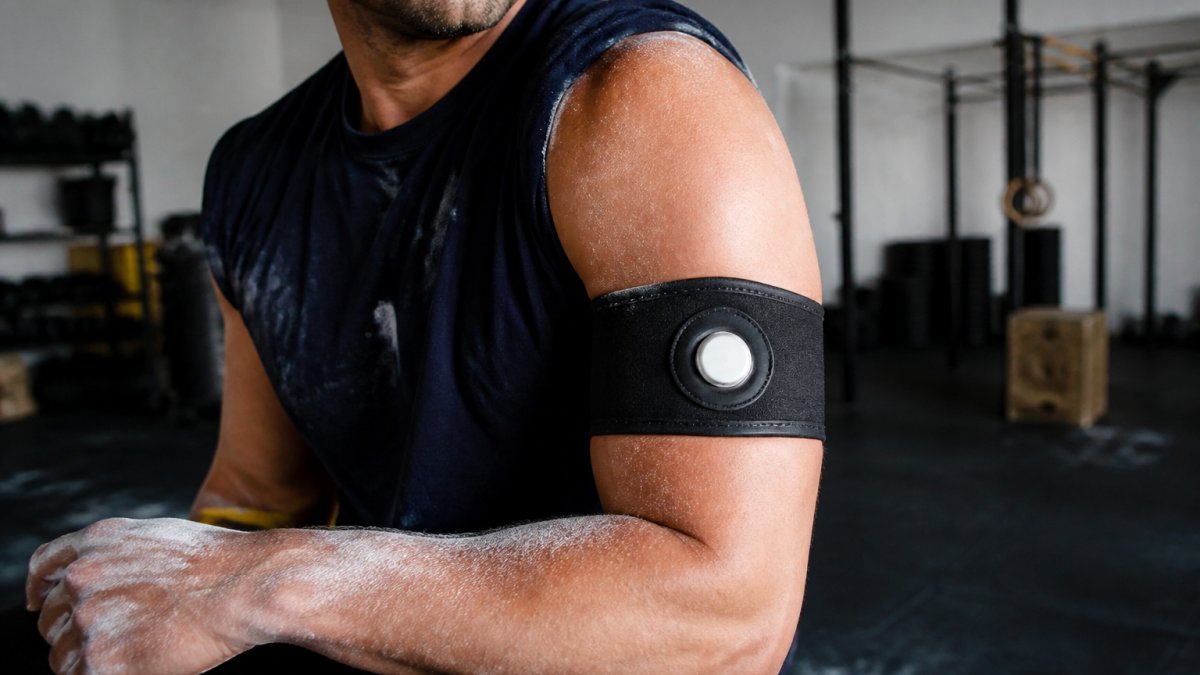
(/ls2black/) before buying. Pricing depends on the model and order size, so check the site for current prices.
2. Libreband: Best for Water Workouts and Swimming
Libreband earns its spot for one reason: the maker explicitly designs it for water. Its armbands are described as suitable for swimming, diving, and competitive athletes, which is a rare claim in this category.
Pros:
- Built for FreeStyle Libre sensors
- Maker names swimming and diving as use cases
- Helps stop the sensor getting knocked off
Cons:
- The supplied results do not list price, sizing, or compatibility beyond FreeStyle Libre
If your CrossFit week includes pool sessions or a hot tub, this is the water-first option. Just confirm sizing before you order, because we could not verify the size range from available information.
3. Dexband: Best for Dexcom Users Who Need a Secure Hold
Dexband is the pick for Dexcom wearers who want a simple, activity-focused hold. The maker lists it as a CGM armband and says its bands help prevent a sensor from being knocked or falling off during sports.
Pros:
- Designed for sensor protection during activity
- Maker identifies competitive athletes among its users
- Simple armband form factor
Cons:
- The supplied results do not specify which Dexcom models it fits, its price, or its sizing
Watch out: confirm the model match before ordering. A band sized for the wrong sensor will shift, and a shifting band leaves the sensor exposed, which is the exact problem you are trying to solve.
4. Wahoo Fitness TICKR FIT: Best Armband Heart-Rate Monitor for Training Data
The TICKR FIT is not a CGM armband, and we want to be direct about that. It is a rechargeable armband heart-rate monitor. REI describes it as a comfortable and accurate all-around choice for heart-rate tracking.
Pros:
- Armband form factor that stays out of the way during lifts
- Rechargeable
- Useful for pairing heart-rate data with glucose trends
Cons:
- It does not hold or protect a CGM sensor at all
Use it alongside a CGM, not instead of protection. If you want to track training intensity and glucose response together, a heart-rate strap plus a secured sensor is a sensible pairing.
How to Keep a CGM Sensor on During Exercise
Keeping a CGM sensor on during exercise comes down to three things: clean, dry skin before application, a band that holds the sensor flat, and avoiding direct friction on the sensor site. Sweat is the main enemy. It loosens adhesive from the edges inward, and once an edge lifts, a barbell or a mat finishes the job.
A practical routine that works:
- Apply the sensor to clean, dry skin and let the adhesive set fully before training
- Add an armband before the workout, not after the edges start lifting
- Keep the band snug but not tight enough to restrict range of motion
If your sensors still peel, our guide on how to stop a CGM sensor peeling off walks through seven fixes in more detail.
CGM Armband Fit and Sizing: Getting the Strap Right
Fit is where most CGM armbands fail in CrossFit, and it is the thing no roundup actually tests. A band that is too loose slides down during overhead work and leaves the sensor edge exposed. A band that is too tight restricts blood flow, gets uncomfortable fast, and ends up in your gym bag by week two. The right fit is snug enough to hold the sensor flat through a WOD and loose enough that you forget it is there between sessions.
Measure the sensor site, not your bicep
Measure your upper arm at the point where the sensor actually sits, usually the back of the upper arm, a few inches below the shoulder, not at the widest part of your bicep. Wrap a soft tape snugly, not tight, and note the measurement. Then match it to the band’s size chart. If you are between sizes:
- Size down for high-impact training. A slightly snugger band resists creeping during burpees and kettlebell work.
- Size up for all-day wear. If you wear the band outside the gym, a looser fit reduces skin irritation.
Fit by sensor model
Fit is not just circumference, it is whether the band’s cut matches your sensor’s footprint. A band designed for a FreeStyle Libre 2 sensor will not sit flat over a Dexcom G7, and vice versa. Before ordering, confirm three things:
- The band lists your exact sensor model, not just the brand.
- The band’s opening or pocket matches your sensor’s diameter and height.
- The strap width covers the adhesive patch edge, not just the sensor body.
| Fit problem | What happens in a WOD | Fix |
|---|---|---|
| Too loose | Band slides toward elbow, sensor edge exposed | Size down or tighten strap |
| Too tight | Discomfort, restricted motion, skin irritation | Size up, reposition higher on arm |
| Wrong model | Band does not sit flat, pressure uneven | Match band to exact sensor model |
| Band too wide | Restricts shoulder range in overhead lifts | Choose a lower-profile band |
| Band too narrow | Does not cover adhesive edge | Choose a band that spans the patch |
Range of motion: the test competitors skip
Before you trust a band in a WOD, test it through the movements that stress it most:
- Overhead squat or snatch, does the band ride up or bunch at the shoulder?
- Front rack, does the bar press the band into the sensor?
- Ring dip or muscle-up, does the band catch on the rings?
If the band moves in any of these, it is not fitted correctly for CrossFit, even if it feels fine standing still. A properly fitted band should stay put through a full session without you adjusting it mid-WOD.
Test a new band on a low-stakes training day before relying on it for a competition or a heavy session. Fit problems show up fast under sweat and load.
Pressure and skin health
A band that presses the sensor too firmly into the skin can cause irritation or, over time, affect how the sensor sits. Check the site after each session for redness or pressure marks. If you see them, loosen the band or switch to a lower-profile design.
For a wider look at gear beyond bands, see our roundup of the best CGM accessories for active lifestyles.
CGM Sensor Protection for Workouts: Sweat, Impact, and Movement
CGM sensor protection for CrossFit comes down to managing three threats, sweat, impact, and movement, plus one thing no armband can fix: sensor lag during rapid glucose swings. Most roundups stop at “wear a band.” Here is what is actually happening under the strap.
Sweat: why adhesive fails from the edge inward
A CGM sensor sits on a small adhesive patch. Sweat and chalk dust collect at the patch edge, and once an edge lifts, every burpee, rope climb, and mat transition peels it further. An armband helps by pressing the patch flat and covering the edge, but it does not stop moisture from wicking under the fabric. Practical countermeasures:
- Apply to clean, dry skin and let the adhesive cure fully before training, most manufacturers recommend waiting before heavy sweating.
- Use an overpatch or skin-tac wipe under the band if you are a heavy sweater; the band alone is not a moisture barrier.
- Rotate sensor sites between sessions so one patch of skin is not constantly stressed.
Impact: the movements that actually threaten a sensor
CrossFit puts the sensor in contact paths most sports never do:
- Barbell work, front rack positions, cleans, and thrusters bring the bar directly across the upper arm where many athletes wear a CGM.
- Gymnastics, ring dips, muscle-ups, and rope climbs drag the arm against rings, rope, and rig uprights.
- Floor work, burpees, handstand push-ups, and turkish get-ups press the sensor into the floor or kettlebell.
An armband’s job is to hold the sensor flat so a bar or ring catches the band’s smooth surface instead of the patch edge. A band that sits proud of the skin can actually increase snag risk, so low-profile designs matter more than thick padding.
Movement: range of motion and strap creep
Repeated shoulder rotation in Olympic lifts works the band against the skin. A silicone band with a grippy inner surface resists creeping; a smooth nylon strap slides. Check the band after overhead work, if it has rotated toward the elbow, it is no longer covering the sensor edge.
The accuracy caveat no armband solves
A CGM measures interstitial fluid glucose, not blood glucose, and the reading lags behind blood glucose during rapid changes, exactly what happens in a hard WOD, a heavy set, or a fasted metcon. During and right after intense intervals, a CGM reading can trail what a fingerstick meter shows. An armband protects the sensor; it does not correct that lag.
If a CGM reading looks wrong during or after training, especially during a fasted workout or a long metcon, confirm with a blood glucose meter before acting on it. Treat CGM data during exercise as a trend, not a diagnosis, and follow your sensor manufacturer’s instructions and your care team’s exercise plan.
Quick protection checklist
| Threat | What it does | Armband fix | What the armband cannot fix |
|---|---|---|---|
| Sweat | Loosens adhesive from the edge | Presses patch flat, covers edge | Moisture wicking under fabric |
| Impact | Bar, ring, or floor catches patch | Smooth low-profile shield | Direct crush force on the sensor |
| Movement | Band creeps, sensor exposed | Grippy inner surface, snug fit | Shoulder rotation stress on skin |
| Rapid glucose change | Reading lags blood glucose | Nothing | Confirm with a meter |
If your sensors still peel, our guide on how to stop a CGM sensor peeling off walks through seven fixes in more detail.
Frequently Asked Questions
What is the best armband to protect a CGM sensor during CrossFit?
The best CGM armband for CrossFit depends on your sensor model and how much movement you expect. Look for a band that holds the sensor flat against your arm, uses an adjustable strap that does not slip under sweat, and leaves the sensor’s filament undisturbed. Libre Shield armbands are designed for FreeStyle Libre sensors and offer robust security during high-intensity training. Check compatibility with your exact sensor before buying, and confirm the band does not cover the sensor’s communication window.
How can I keep my CGM sensor from coming off during a workout?
Start with clean, dry skin and let any adhesive fully cure before training. Wear a CGM armband over the sensor for mechanical support, especially during movements that involve arm contact like burpees or cleans. Avoid lotions and oils near the sensor site, and pat the area dry after sweating. If you swim or shower frequently, choose a band with water resistance. A secure fit matters more than a tight one: too much pressure can affect readings and irritate skin.
Do CGM armbands work with every sensor model?
No. Armbands are cut and sized for specific sensor shapes. Libre Shield armbands are designed for FreeStyle Libre sensors. Before ordering, confirm the band fits your sensor’s diameter and does not block the reader or phone connection. If you switch sensor brands, you will likely need a different armband. Check the maker’s specifications directly.
Can sweat affect a CGM armband or sensor?
Sweat can loosen adhesive and cause a band to slide, which is why sweat resistance matters for CrossFit. A band with a grippy inner surface and an adjustable strap holds position better during high-sweat sessions. After training, rinse and dry the band according to the maker’s instructions to prevent salt buildup and skin irritation. If your sensor edge lifts, replace the adhesive or band.
CrossFit exposes every weak point in your CGM setup, and a sensor that stays put is the difference between clean data and a replacement every week. Libre Shield builds sensor saver armbands with medical-grade silicone and model-specific fits for FreeStyle Libre 2 and Dexcom G7, so your sensor stays shielded through sweat, chalk, and contact. Get started with Libre Shield and keep your sensor secure through every workout.
