Quick Summary
The best way to keep a cgm sensor secure is to start with clean, dry skin, since moisture, oils and friction cause most early failures. Then add a protective layer such as a barrier wipe, an overpatch or an armband, and rotate placement so the same spot is not reused.
- Wash the site with soap and water and dry it completely before applying the sensor.
- Avoid lotions, oils and creams on the application area.
- Pick a spot with little hair and few folds, and rotate sites.
- Add an overpatch or armband for workouts, showers and swimming.
- Replace a sensor that has fully separated rather than taping it back down.
Table of Contents
- Why CGM Sensors Fall Off Early and What It Costs You
- How to Prepare Your Skin Before Applying a CGM Sensor
- Choosing the Best Adhesive for Dexcom G7 and Other Sensors
- Securing Your Sensor With Overpatches, Tape and Armbands
- How to Keep a Libre 3 Sensor From Falling Off During Exercise and Water Activities
- Troubleshooting a Sensor That Peels or Falls Off Early
- Replacement, Warranty and Next Steps When Your Sensor Fails
- Frequently Asked Questions
Why CGM Sensors Fall Off Early and What It Costs You
A CGM sensor that peels off after a few days wastes money you did not plan to spend. Most users blame the adhesive, but moisture, skin oils, friction and sweat usually cause the failure. Knowing the cause makes it much easier to stop.
Sensor saver armbands are one way people add extra security during daily life, sports and water activities. The sections below walk through seven practical ways to keep your sensor attached longer.
Adhesion problems happen most during exercise, showers and hot days. Dexcom guidance on keeping a CGM sensor from falling off recommends starting with clean, dry skin, which is the single most useful step you can take.
- Sweat and moisture loosen the adhesive edges.
- Lotions and oils block the adhesive from grabbing the skin.
- Friction from clothing, seatbelts and bags lifts the edges.
- Reusing the same spot irritates the skin and weakens adhesion.
A sensor that falls off early means a replacement sooner than planned. Each early replacement adds to your diabetes costs, so small fixes can save money over time.
The four common causes of early sensor failure are listed below, with the symptom each one produces.
| Cause | What it does | Effect |
|---|---|---|
| Sweat and moisture | Loosens adhesive edges | Sensor lifts early |
| Lotions and oils | Blocks adhesive from grabbing skin | Sensor fails to stick |
| Friction | Clothing, seatbelts and bags lift edges | Edges peel |
| Reusing the same spot | Irritates skin and weakens adhesion | Sensor falls off sooner |
How to Prepare Your Skin Before Applying a CGM Sensor
Clean, dry skin is the foundation of good sensor adhesion. Preparation takes only a few minutes and makes a noticeable difference.
Wash the application site with soap and water, then dry it completely. Avoid lotions, oils and creams on the area before you apply the sensor.
- Pick a spot with little hair and few folds.
- Rotate sites so you do not reuse the same skin area.
- Let alcohol wipes dry fully before applying the sensor.
Watch out: applying a sensor over freshly moisturized skin is one of the most common reasons for early peeling.
Choosing the Best Adhesive for Dexcom G7 and Other Sensors
Adhesive aids can help a sensor stay put, but the right choice depends on your skin, your activity level, and when in the wear cycle you apply it. A deeper comparison of protective gear for Libre sensors covers the options side by side. The table below is not a ranking; it is a use-case map so you can match the tool to the failure you are trying to prevent.
diaTribe guide to CGM tips and tricks lists options such as Skin-Tac, Skin-Prep, Simpatch and Durapore. Each works a little differently.
- Skin-Tac: a liquid or wipe that creates a sticky base layer between skin and sensor adhesive. Best applied to clean, dry skin and allowed to become tacky before the sensor goes on. It helps most when oily skin or light sweat is lifting edges, but it can feel tacky under clothing and is harder to remove than a patch.
- Skin-Prep: a barrier wipe that leaves a protective film rather than a sticky layer. It helps most when irritation or adhesive sensitivity is the reason sensors come loose, because it reduces direct contact between the device adhesive and skin. It adds less holding power than Skin-Tac, so pair it with an overpatch if friction is also a problem.
- Simpatch: a pre-cut overpatch shaped to frame the sensor and hold its edges down. It helps most when clothing, seatbelts, or bags are catching an edge. Apply it after the sensor is fully seated and dry, and press the edges for several seconds. It covers more skin than tape, which can trap moisture if you sweat heavily.
- Durapore: medical tape for reinforcing a single lifting edge rather than covering the whole sensor. It helps most as a mid-wear rescue when one corner starts to curl. It is breathable and low-profile, but it does not prevent the initial lift the way a full overpatch does.
A practical way to choose is to match the aid to the cause. If edges lift after showers or swimming, a barrier wipe plus a water-resistant overpatch is one option to consider. If the sensor slides during workouts, a sticky base layer under the sensor plus an armband is one approach some users try. If redness or itching appears before the sensor loosens, a barrier wipe is the safer first step and a sticky liquid may make irritation worse.
Application timing matters as much as product choice. Skin-prep wipes and sticky liquids need to dry fully before the sensor is applied; applying over a wet layer weakens the bond. Overpatches should go on after the sensor has warmed to skin temperature and the surrounding skin is completely dry.
Adhesive products may not suit everyone. People with adhesive allergies or skin irritation should test a small patch on a non-sensor area for 24 hours first and talk with their care team before regular use. Stop using any product that causes spreading redness, blistering, or itching that lasts more than a day.
Best for: matching a specific failure pattern rather than buying every product.
Skip if: you have a known allergy to the materials, in which case check with your care team first.
Securing Your Sensor With Overpatches, Tape and Armbands
An overpatch or armband adds a second layer of protection over the sensor. This is often the easiest way to stop lifting edges during workouts.
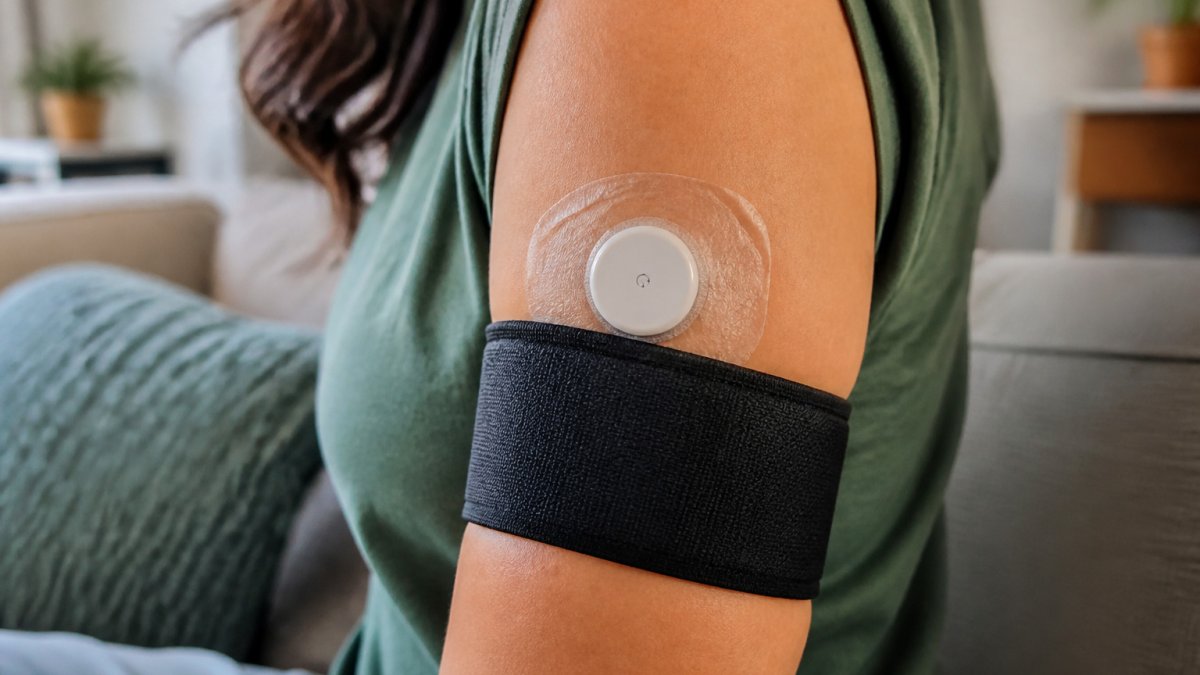
CDC information on continuous glucose monitors notes that an extra adhesive patch can add protection, especially during bathing or swimming.
- Choose an armband that matches your sensor model.
- Check that the sensor is fully dry before you put the armband on.
- Remove and reapply the overpatch carefully if the edges start to lift.
Best for: users who exercise often or wear the sensor on the upper arm.
Skip if: you have a known allergy to the materials, in which case check with your care team first.
How to Keep a Libre 3 Sensor From Falling Off During Exercise and Water Activities
Exercise and water activities put more stress on a sensor than daily life does. Sweat, friction and swimming all test adhesion.
Abbott FreeStyle Libre product information provides device details for Libre sensors. Check the instructions for your exact model before swimming or heavy exercise.
- Apply a barrier wipe before the sensor goes on.
- Add an overpatch for the workout or swim.
- Dry the area gently after showering or swimming.
- Avoid pulling at the edges of the patch.
Troubleshooting a Sensor That Peels or Falls Off Early
If a sensor starts peeling, act quickly, but first identify the cause. The detailed fixes for peeling sensors walk through each cause step by step. Lifting edges let in moisture and can cause the whole sensor to come off, and the fix depends on why the edge lifted in the first place. Use the flow below to match the symptom to a cause and a specific correction.
- Check whether the sensor is still reading correctly. If readings are erratic or missing, treat it as a failed sensor and follow the replacement steps in the next section rather than trying to reattach it.
- Inspect the failure pattern before you reinforce anything. Note whether the adhesive is lifting evenly around the edge, curling at one corner, or releasing in the center. The pattern points to the cause.
- Match the cause to a fix:
- Moisture or sweat: edges lift after showers, swimming, or hot weather. Fix: dry the area thoroughly, apply a barrier wipe, and add a water-resistant overpatch before the next wear.
- Oily skin or residue: the adhesive never fully grabs and lifts within the first day. Fix: wash with soap and water, skip lotions, and use a sticky base layer such as Skin-Tac under the sensor.
- Placement: sensors on folds, hairy areas, or high-friction spots lift early. Fix: rotate to a flatter, less hairy site and avoid reusing the same spot for at least one wear cycle.
- Friction or pulling: clothing, seatbelts, bags, or sleep position catch an edge. Fix: add an overpatch or armband and change clothing or sleep positioning where possible.
- Adhesive sensitivity: redness, itching, or a rash appears before the sensor loosens. Fix: switch to a barrier product, patch-test first, and stop using the product if irritation spreads.
- Reinforce a lifting edge carefully. Use medical tape or an overpatch on a dry edge, and press for several seconds. Do not press down on a sensor that has already separated from the skin; trapped moisture under a reattached edge can irritate skin.
- Log the failure. Record the sensor start date, site, activity before the lift, and the fix you tried. Patterns in the log often show the cause, such as a certain activity, a certain body spot, or a product that does not suit your skin.
Watch out: reattaching a sensor that has fully separated from the skin can trap bacteria and cause irritation, and it may also produce unreliable readings. If the sensor has come completely off, replace it rather than taping it back down.
A common pattern is that the same site fails repeatedly. If your log shows that, change the site before changing products; placement is often the cheapest fix.
Replacement, Warranty and Next Steps When Your Sensor Fails
If a sensor fails early, check whether the manufacturer offers a replacement. Recall notices and warranty terms vary by product, so review the instructions that came with your device or contact the manufacturer directly.
FDA medical device recall information lists current recalls. Check this source if your sensor is ever part of a recall.
Your insurance may also cover some sensor costs, depending on your plan. FreeStyle Libre cost and coverage information explains coverage and copay options for eligible users, which may affect how much you pay for each replacement.
When a sensor fails, keep a backup glucose meter on hand and follow your care team’s monitoring plan. Protecting your sensor is useful, but your safety comes first.
Frequently Asked Questions
How do I keep a Dexcom G7 sensor from falling off?
Clean the application site with soap and water, dry it completely, and avoid lotions or oils before insertion, since clean, dry skin supports better adhesion. Apply the sensor firmly for the full recommended time, then add an overpatch or adhesive wipe if you are active or sweating. Keeping the site rotated also reduces skin irritation that can loosen the adhesive over time.
What should I do if my FreeStyle Libre sensor falls off early?
Check whether the sensor is part of a manufacturer recall or warranty program. If it is not, contact the manufacturer or your pharmacy to ask about replacement and warranty options, and document the wear time and circumstances. Going forward, use skin prep and a supplemental adhesive or overpatch to reduce the chance of a repeat failure.
Should I cover my FreeStyle Libre sensor when showering?
Many users add an extra adhesive patch or overpatch for showers, baths and swimming, especially if the sensor edges are already lifting. An extra adhesive patch can provide additional protection during activities like bathing or swimming. Pat the area dry afterward and check the edges regularly so you can reinforce the sensor before it peels.
What is the best adhesive to keep a CGM sensor in place?
Common options include Skin-Tac in liquid or wipe form, Skin-Prep barrier products, pre-cut patches such as Simpatch, and medical tape such as Durapore. The right choice depends on your skin sensitivity and activity level. If you have adhesive allergies or irritation, a barrier product may be gentler than tape, so test a small area first and talk with your care team about options that suit your skin.
Start with clean, dry skin, add a secure overpatch or armband, and track what happens with each sensor. Libre Shield’s sensor saver armbands are built to help your sensor stay in place through everyday activity, so you replace fewer sensors and keep more of your money.
